Hey everyone,
Today I wanted to share something I've been tinkering with – a very early, crude, and simple Flask application designed to handle a Hive Keychain login using a posting key signature. This is definitely a work in progress, but I thought I'd put it out there for anyone interested.
The project is called flask_keychain and the idea is to provide a basic backend that can:
- Receive a login request from a frontend that uses Hive Keychain to sign a message.
- Verify the signature against the user's posting key.
- If valid, issue a simple session token.
How It Works (The Gist)
The system involves a simple HTML frontend that uses JavaScript to interact with the Hive Keychain browser extension, and a Python Flask backend to verify the signed message.
Frontend (JavaScript & Keychain):
- When you enter your username and click "Login," the JavaScript captures the username.
- It then calls
window.hive_keychain.requestSignBuffer(). This prompts Hive Keychain to ask you to sign a message (in this basic example, it's the current UTC date/time string) using the posting key of the entered username. - If you approve in Keychain, the extension returns the signature (
response.result) and the public posting key (response.publicKey) that was used. - The JavaScript then sends your
username, thesignature(as "challenge"), thepublicKey, and the originalmessage(as "proof") to the Flask backend's/loginendpoint.
Here's the core JavaScript that handles the Keychain interaction and the call to the backend:
function getCurrentUTCDateTime() {
  const now = new Date();
  return now.toISOString();
}
document
  .getElementById("loginForm")
  .addEventListener("submit", function (e) {
    e.preventDefault();
    const username = document.getElementById("username").value.trim();
    const status = document.getElementById("status");
    status.textContent = "";
    if (!username) {
      status.textContent = "Please enter your Hive username.";
      return;
    }
    if (typeof window.hive_keychain === "undefined") {
      status.textContent = "Hive Keychain extension not detected!";
      return;
    }
    const datetimeToSign = getCurrentUTCDateTime(); // This will be our message
    window.hive_keychain.requestSignBuffer(
      username,
      datetimeToSign, // Message to sign
      "Posting", // Key type
      function (response) {
        if (response.success) {
          status.textContent = "Posting signed! Sending to API...";
          const signature = response.result;
          const pubkey =
            response.publicKey ||
            (response.data && response.data.publicKey) ||
            null;
          if (!pubkey) {
            status.textContent =
              "Could not retrieve public key from Keychain response.";
            return;
          }
          const payload = {
            challenge: signature, // The signature from Keychain
            username: username,
            pubkey: pubkey, // The public key Keychain used
            proof: datetimeToSign, // The original message that was signed
          };
          fetch("/login", {
            method: "POST",
            headers: { "Content-Type": "application/json" },
            body: JSON.stringify(payload),
          })
            .then((r) => r.json())
            .then((data) => {
              if (data.success) {
                let msg = "Login successful! <br>";
                if (data.token) {
                  localStorage.setItem("token", data.token);
                  msg += ` Token: <code>${data.token}</code> <br>`;
                }
                status.innerHTML = msg;
              } else {
                status.textContent = data.error || "Login failed.";
              }
            })
            .catch((err) => {
              status.textContent = "API error: " + err;
            });
        } else {
          status.textContent = "Keychain signature failed.";
        }
      },
    );
  });
Backend (Python Flask &
hive-nectar):- The
/loginroute in Flask receives theusername,signature(referred to as "challenge" from the frontend),publicKey, and originalmessage(referred to as "proof" from the frontend). - It fetches the actual posting keys for the provided
usernamefrom the Hive blockchain usinghive-nectar. - It verifies that the
publicKeysent by the client is indeed one of the account's valid posting keys. - It then uses
nectar-graphenebase's (a component ofhive-nectar)verify_messagefunction to check if thesignatureis valid for the givenmessageandpublicKey. - If everything checks out, it generates a secure random session token (using
secrets.token_urlsafe) and sends it back to the client.
Here’s the key Python snippet from
app.pyfor the verification:# (Previous steps: get data from request, fetch account's posting keys) # 'message' is what Keychain signed (datetimeToSign from JS, sent as 'proof') # 'signature' is the hex string from Keychain (sent as 'challenge' from JS) # 'pubkey' is the public key Keychain reported using for signing # Check that provided pubkey is one of the account's actual posting keys if pubkey not in posting_keys: return jsonify({ "success": False, "error": "Provided public key is not a valid posting key for this account.", }), 400 # Verify signature try: recovered_pubkey_bytes = verify_message(message, bytes.fromhex(signature)) recovered_pubkey_str = str(PublicKey(recovered_pubkey_bytes.hex(), prefix="STM")) valid = recovered_pubkey_str == pubkey except Exception as e: return jsonify({"success": False, "error": f"Signature verification error: {str(e)}"}), 400 if not valid: return jsonify({"success": False, "error": "Signature is invalid."}), 401 # Success: generate and return a session token token = secrets.token_urlsafe(32) sessions[token] = username # Simple in-memory store for this example return jsonify({"success": True, "username": username, "token": token})- The
This frontend/backend interaction provides a basic but functional way to authenticate a Hive user via their posting key.
The Basic Frontend
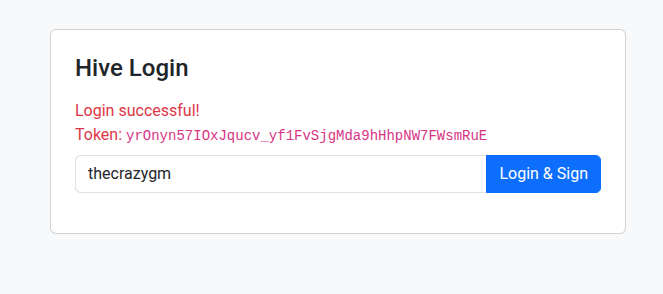
I've included a super simple HTML template (login.html) that just provides a basic login button which uses the JavaScript above to trigger the Keychain signature request and send it to the Flask backend. If successful, it just displays the token.
Where to Find It
This is very much a proof-of-concept and a starting point. If you're interested in playing around with it or seeing the basic structure, you can find the code on GitHub:
https://github.com/TheCrazyGM/flask_keychain
It's not meant to be a production-ready solution as-is, but more of a demonstration of how one might start building a Flask backend for Hive Keychain posting key logins. Maybe it'll be useful to someone looking to integrate Hive login into their Python web projects!
EDIT: I would like to give a shoutout to @sagarkothari88 who made the distriator api login, which inspired this idea.
As always,
Michael Garcia a.k.a. TheCrazyGM